Expensya by Medius
Top Tips
Explore each category and click on any tip to learn more.
Employee communication
AI-generated receipt detection
Expense history
Non-compliant expenses filter
Assign approver by category
Assign an approver for each category
Would you like to add an extra level of control for a specific expense category ?
Refine your approval workflow with the new “Approver by category” setting! ✅
🔎 Common use cases:
-
IT for approving IT equipment
-
Mobility for fuel expenses
-
HR for training expenses
-
Finance for general expenses
⚙️ How does it work?
-
This setting can be activated by our Support team only
-
Once activated, a new “Approval” tab appears in each expense category
-
Administrators can then configure the approver autonomously
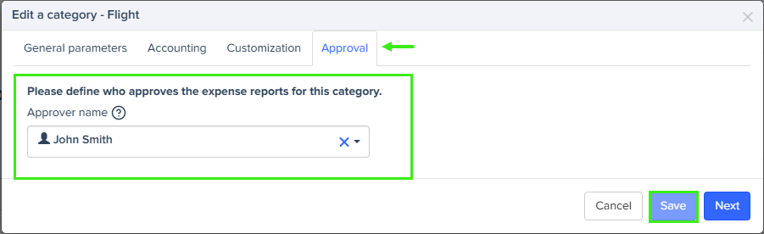
👥 Flexible approval options:
-
Assign a named individual
-
Or use a generic email address for team-based approval
🔁 Workflow rules to know:
-
The category approver is always the first level of approval
-
Subsequent levels remain unchanged and follow the standard approval flow (project-based, then hierarchical)
🎯 Key benefits:
-
A more precise workflow, better aligned with your internal processes
-
Faster and more relevant approvals
-
Better control from the very first step, without adding complexity to the overall workflow
💡 Need activation?
Contact our Support team, who will activate the feature for your environment.
Streamline your workflow with the non-compliant expenses filter
Want to speed up expense report reviewing even more?
Discover the new “Non-Compliant Reports” filter! ✅
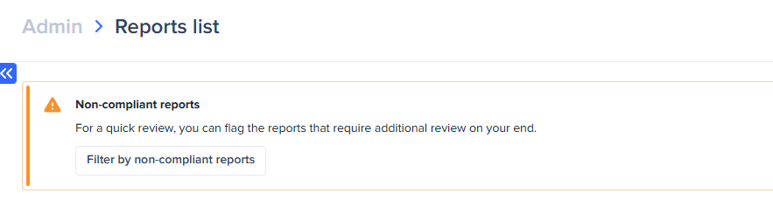
This filter, available directly from the report list, allows administrators and managers to instantly identify all reports requiring special attention, without having to browse through every single one.
🔎 Detected non-compliant reports:
-
Expense triggering the display of a rule configured in the expense policy (excluding informational rules)
-
Expense with an exception request for reimbursement above the configured limit
-
Expense with fraud-detection alerts:
Alerts related to the receipt (format, quality, modification)
Alerts related to duplicates (expenses or guests)
Alerts related to modifications made by the user (increased mileage, modified amount, etc.)
💡 Coming soon: for more relevant reviewing, expenses triggering the display of a rule configured in the expense policy will be excluded from the filter.
Why? The rules appear but must necessarily be followed, so these expenses do not require special review.
When? Planned for late 2025.
Discover the automatic expense report submission
Do you want to make expense report submissions easier for your employees? Discover Auto Submission! ✅
This feature automatically submits, on behalf of your employees, their expenses or reports with the "verified" status according to the frequency you set in the configuration. No more waiting for them to do it manually!
📤 Auto submission in a nutshell:
-
Automatic creation and submission of verified expenses or reports
-
Flexible configuration of submission frequency (weekly, monthly…)
-
Time savings for both your employees and finance teams
💡 What you should know:
-
Employees can still submit reports manually
-
They can also exclude certain reports from the automatic process
-
A reminder is sent 3 days before the automatic submission
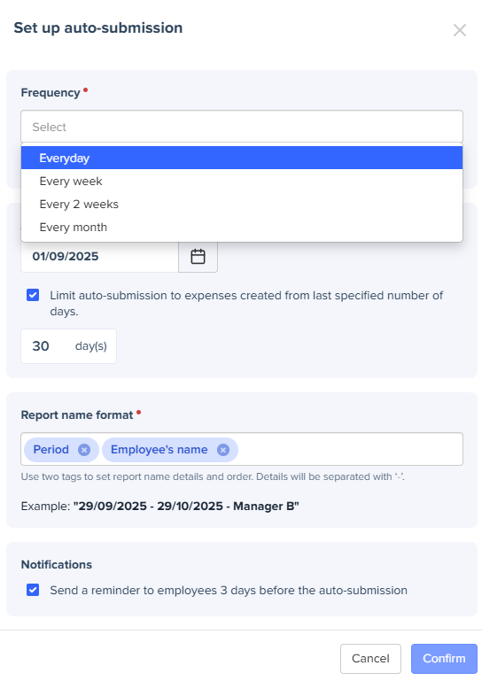
📆 Auto Submission can be activated directly from the Admin interface via Global Settings > Approval > Auto Submission of Reports.
Do you want to know the timeline of an expense ? It’s now possible ! ✅
Find the "history" icon on every expense  (top right) to provide all users with full traceability from both the web and mobile interfaces.
(top right) to provide all users with full traceability from both the web and mobile interfaces.
🔎 What you can see :
-
Expense creation (who, how, when)
-
Modifications made: before/after, field by field
-
Status changes (submitted, approved, rejected…)
-
Special cases: duplications and splits
🙌 Benefits for you :
🔍 End-to-end traceability for every expense
🧾 Simplified controls & audits
⚡ Instant access to key information independently
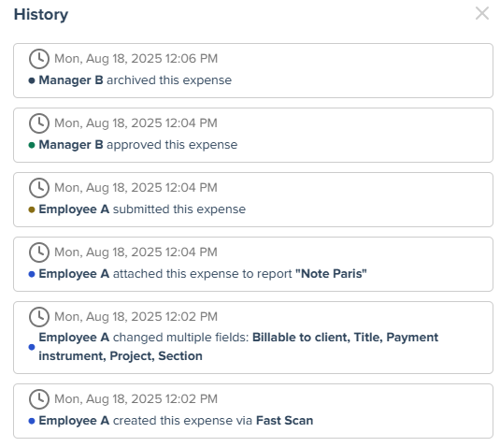
📆 Expense history is now available for expenses, and will be coming soon for mileage and per diems
➡️ Go to an expense and click on the History tab to try out this new feature!
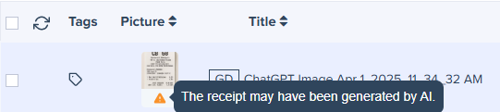
🤖 AI is evolving fast — but Expensya has you covered: potentially AI-generated receipts are automatically flagged.
✅ Smarter detection, zero disruption:
-
An alert icon appears for suspicious receipts, directly within the approval interface
-
Alerts are visible only to approvers and administrators
-
Automatically enabled on the web version — no setup required
⚙️ How does it work?
When a receipt appears to have been generated using AI, an alert is displayed:
📍 At the expense report level
📍 On the individual expense line
📍 Inside the expense details
📌 What this feature brings you:
🛡 Better fraud prevention
🕵️ Fast and targeted identification of risky receipts
💼 Easier and more confident approval for managers and admins
Did you know that you can now split an expense across multiple categories or projects in Expensya? 💡
Perfect for situations like a hotel night including breakfast, or an invoice that needs to be shared between several cost centers.
More accurate expense management:
-
Assign a single expense to multiple analytical categories (e.g. Hotel 🛏 + Breakfast ☕️)
-
Or split it between different cost centers, projects, or departments
How does it work?
From the expense form, simply click on "Actions" then “Split expense” to create multiple expense lines from the same receipt.
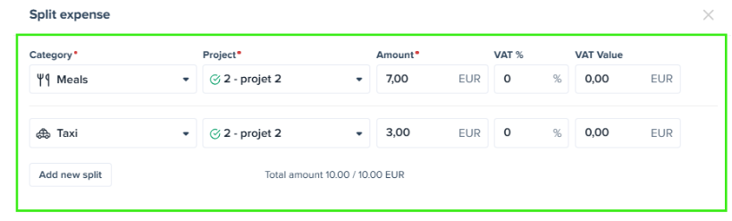
This feature enables:
-
Better budget tracking 🔍
-
More accurate cost allocation 💰
-
Improved compliance with your internal policies ✅
Employee communication
Want to share an important message with your employees, directly in Expensya?
You can display a communication banner from the "Employee Guide" tab in your admin interface📣
✅ Guaranteed visibility: The banner appears at the top of the page as soon as users log in, and remains visible until it's closed by the employee or removed by the administrator.
✅ Targeted communication: Customize banners by group (analytical axis) to tailor the message to each team.
✅ Easy setup: Manage your messages effortlessly from the admin space – you can even configure multiple banners at once.

📱 Coming soon to Expensya Next for mobile display, in addition to the web version!
📌 Reminder: the Employee Guide feature also allows you to share all your expense-related documentation with your teams: user guides, travel policies, and more.


Missing Receipt Declaration
No more blocked reimbursements because of a lost receipt! With the Missing Receipt Declaration, your employees can now report an expense while staying fully compliant 📌
✅ Less frustration: No more rejecting reimbursements due to a simple oversight
✅ Time-saving: A quick declaration integrated directly into Expensya
✅ 100% compliant: Secure archiving and guaranteed traceability
📢 Activate this option now in your Expensya settings and make expense management easier for your whole team!
Coming in the 2025 roadmap: expense tracking for items created via the "lost receipt" feature
Save time with your Expensya Direct Email Address!
No more manual receipt transfers—have them sent directly to Expensya from your merchant. 🚀
✅ A unique email address just for you
✅ Receipts go straight into Expensya
✅ Zero effort, fully automated!
🚕Took a taxi and asked to which email address the invoice should be sent?
➡️ Share your Expensya address, and the expense will be created automatically!
📩 Find your email address and try it now: Guide here

