Software Comparison
Medius vs. Kofax
Which AP automation platform is best for enterprise teams?

Which AP automation platform is best for enterprise teams?
Medius and Kofax both help accounts payable teams reduce manual work, but they approach enterprise AP automation differently. Medius is designed specifically for AP automation and invoice-to-pay workflows across one or multiple ERPs, while Kofax is often evaluated as a broader automation and data capture platform.
This comparison outlines how they differ in invoice capture, matching, ERP integration, reporting, deployment, and long-term scalability.
Medius is typically the better fit for enterprise AP teams that want invoice-to-pay automation across one ERP or multiple ERPs, with automated matching, centralized reporting, and consistent workflows. Kofax is often a strong fit for organizations prioritizing document capture and broader automation programs, especially in SAP-embedded environments. For most enterprise AP modernization initiatives focused on standardizing AP without replacing the ERP, Medius is usually the more purpose-built option.

Medius is a leading accounts payable automation platform that supports enterprise invoice processing, matching, exception handling, and end-to-end AP control without requiring an ERP replacement.
Medius helps AP teams:
Kofax is an intelligent automation platform focused on document capture, workflow automation, and broader process automation across industries.
Kofax is widely known for its history in invoice capture and document automation, including its ReadSoft and Kofax TotalAgility products. Many organizations use Kofax as part of a broader automation strategy, especially when they want to automate multiple document-heavy workflows beyond accounts payable.

Here is a high-level comparison of the capabilities enterprise teams typically evaluate when selecting AP automation software.
Legend:  Strong fit
  Depends on ERP or configuration
  Limited for this use case
| CAPBILITY / FEATURE | MEDIUS | KOFAX |
| Best fit |
Enterprise AP automation and invoice-to-pay workflows |
Broader automation and capture programs, including AP |
| Invoice capture (header and line) |
Designed for enterprise capture and matching outcomes |
Strong capture capabilities, but experience varies by product (ReadSoft, KTA, AP Essentials) |
| Touchless invoice processing |
Improves touchless rates through capture, matching, and exceptions |
Touchless outcomes depend on configuration and ERP environment |
| AP in SAP environments |
Supports SAP AP automation without replacing SAP |
Strong fit when AP is embedded in SAP via Process Director |
| 2-way and 3-way matching |
Automated matching designed to work across ERPs |
Matching support varies by ERP and may require more manual steps in some environments |
| 3-way matching in Microsoft Dynamics environments |
Automated matching in Dynamics environments |
Matching automation varies and may require more manual steps |
| Multi-ERP AP standardization |
Built for multi-ERP enterprise AP standardization |
Possible, but consistency depends on how modules are deployed across systems |
| Exception handling and auto coding |
Strong exception workflows with automated coding support |
Depends on workflow configuration and product setup |
| Reporting across AP workflows |
Centralized reporting across AP workflows |
Reporting may vary depending on module mix and workflow configuration |
| Reporting consistency across modules |
One reporting environment for end-to-end AP visibility |
Reporting may be distributed across products depending on deployment |
| Benchmark reporting |
Flexible benchmark reporting to support continuous improvement |
Typically not included as a standard benchmarking model |
| E-invoicing and compliance readiness |
Supports e-invoicing automation and provider integrations |
Available through specific solutions and networks depending on region |
| Unified UI and login experience |
Single UI across the AP workflow |
User experience can vary depending on products and logins |
| Broader document automation |
Primarily focused on AP and spend outcomes |
Strong fit for organizations automating multiple document-heavy processes |
| Procurement workflow support |
Supports broader procure to pay and spend workflows |
Procurement outcomes depend on connected systems and workflow design |
| Payment automation coverage |
Supports AP as part of end-to-end invoice-to-pay outcomes |
Payment outcomes depend on connected systems and workflow design |
| Deployment approach |
Structured AP automation rollout and ERP coexistence |
Timelines vary widely depending on whether Kofax is deployed for AP only or broader automation |
| Partner ecosystem |
Strong implementation model |
Strong global partner ecosystem in many regions |
| Cloud architecture and feature delivery |
True multitenant cloud with consistent feature delivery |
Cloud experience varies by product (hosted vs cloud-native) |
| Long-term platform strategy |
Cloud-first AP automation suite |
Broader platform with a mix of newer and legacy product lines |
If you are deciding between Medius and Kofax, these questions can help narrow down which platform fits your environment.
Are you primarily automating accounts payable, or do you need a broader document automation platform?
Do you need consistent AP workflows across multiple ERPs or business units?
How important is automated 3-way matching for your AP process and ERP setup?
Do you need benchmark reporting to measure and improve AP performance over time?
Are you prioritizing faster time-to-value, or do you expect a highly customized deployment?

Invoice capture is a major area of evaluation for enterprise AP teams, especially when line-level detail and exception handling are critical.
Medius
Medius supports high-volume invoice capture and touchless processing, including:
This approach can be especially valuable for teams processing high invoice volumes or managing multiple business units, suppliers, and approval paths.
Best-in-class Medius customers see:

Touchless Capture Rate
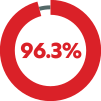
Touchless Processing Rate
Kofax
Kofax offers several capture solutions, including AP Essentials, ReadSoft, and Kofax TotalAgility. For enterprise teams, the capture experience often depends on:
If a team is evaluating Kofax for AP automation, it is typically worth confirming how line-level extraction is handled, and whether capture, workflow, and reporting are delivered through a consistent user experience.
For enterprise AP, capture is only part of the equation. The larger challenge is how well a platform supports matching, exception handling, and process consistency across ERP environments.
Medius
Medius supports AP automation across ERP systems and multi-ERP environments. Enterprise teams often evaluate Medius for its ability to support:
This includes environments such as Microsoft Dynamics, SAP, and Infor, and more.
Kofax
Kofax is often strongest in environments where it is embedded into specific ERP workflows, such as SAP. It can also be a fit for organizations that want a broader automation platform beyond AP.
For teams running Microsoft Dynamics environments, it is important to evaluate the depth of matching and the level of manual work required for 3-way matching.
Reporting is one of the areas where enterprise AP teams see the impact of platform design.
Medius
Medius includes end-to-end AP reporting and statistics in one reporting environment, with:
This can be valuable for AP leaders who want to track progress over time and compare performance across teams or entities.
Kofax
Kofax reporting capabilities often depend on which products are deployed. For organizations using Kofax as a broader automation platform, reporting may be distributed across multiple modules or workflows.
If reporting and benchmarking are priorities, it is worth confirming how KPI reporting is delivered across capture, workflow, and AP outcomes.
Implementation speed affects not only project cost, but also internal adoption and business confidence.
Medius
Medius is often selected for faster time to value in enterprise AP deployments, supported by:
Kofax
Kofax deployment timelines vary based on the scope. When Kofax is deployed as a broader automation platform, implementation may require more services, configuration, or partner support.
For teams prioritizing speed, it is worth confirming what a typical deployment includes and what is required to reach a stable AP workflow.
For many enterprise teams, the goal of AP automation is not only faster invoice processing. It is improving control across the full procure-to-pay lifecycle, from purchasing and approvals to invoice matching, payments, and reporting. This distinction matters most for organizations looking to move beyond invoice automation toward standardized spend control and visibility.
Medius
Medius supports procure-to-pay outcomes by connecting invoice automation with broader process visibility, policy controls, and reporting. This can be especially useful for organizations focused on spend management, audit readiness, and standardizing workflows across multiple systems.
Kofax
Kofax is often evaluated as part of a broader automation strategy. Procure-to-pay outcomes may depend on which Kofax products are deployed, how workflows are configured, and which purchasing or spend systems are connected.
Enterprise teams are not only choosing software. They are choosing the product roadmap and the long-term experience of running AP automation at scale.
Medius
Medius is built for cloud delivery and continuous improvement, with:
Kofax
Kofax is a larger automation platform with a broader scope. The AP experience may vary depending on which products are used and how they are supported over time.
For enterprise buyers, it is worth confirming the product roadmap for the specific capture and AP modules being considered.
Pricing differences often come down to how many products are required to support the full AP workflow and how much configuration or partner support is needed. Both Medius and Kofax typically use quote-based pricing, since costs depend on invoice volume, ERP environment, number of entities, and deployment scope.
Medius pricing
Medius offers two AP Automation packages:
Additional Medius spend suite applications can be added for an additional cost.
Kofax pricing
Kofax pricing varies based on the products included (capture, workflow, and ERP-specific solutions), the implementation scope, and partner services.
To accurately compare total costs, request a quote based on your ERP environment and invoice volume.
Kofax may be a good fit if your organization:
Needs AP embedded directly in SAP environments
Wants a broader automation platform for multiple document-heavy processes
Requires a highly customized workflow engine
Has existing Kofax partners or infrastructure in place
Medius is often selected when enterprise AP teams need to standardize automation without replacing the ERP.
Medius is a strong fit when you need:

Multi-ERP AP automation with consistent workflows
Line-level capture and matching at enterprise scale
Procure to pay visibility and control, not just invoice capture
One user experience across AP workflows
Reporting and benchmarks that support continuous improvement
Faster deployment with lower long-term complexity
Whether you are evaluating Medius, Kofax, or another AP automation platform, these questions can help you identify which solution is best aligned to your ERP environment and enterprise AP needs.
Can you show line-level extraction and matching on real invoices, not just sample templates?
How does 3-way matching work in our ERP environment, including exceptions and tolerances?
If we run multiple ERPs, can we standardize workflows and reporting across all entities?
What reporting is included out of the box, and how are KPIs tracked over time?
What does the implementation timeline typically look like for teams with our invoice volume?
How are product updates delivered, and how often are new features released?
What level of support is included post go-live, and what does escalation look like?

Medius supports AP automation across multiple ERPs and standardizes workflows across enterprise finance environments.
Matching capabilities can vary depending on the Kofax solution and ERP environment. If Dynamics is part of your ERP landscape, it is important to evaluate how much matching can be automated versus handled manually.
Kofax is broader than capture. It is often used for workflow automation across multiple processes. The AP experience depends on which Kofax products are deployed and how they are configured.
Request a demo to explore touchless capture, multi-ERP matching, and enterprise reporting.