
Accounts payable automation (AP automation) is technology that digitizes and streamlines the invoice-to-pay process. This type of invoice automation reduces manual work by automatically capturing and validating invoice data, routing approvals, syncing with ERP systems, and executing payments, which helps organizations process invoices faster, reduce errors, and gain better visibility into spend and liabilities.
In simple terms, AP automation helps businesses process supplier invoices accurately, efficiently, and with far less manual effort.
Modern AP automation goes far beyond scanning and data entry. Today’s best automated accounts payable solutions use AI to reduce exceptions, detect risk, and help teams resolve issues faster so invoices move forward with minimal touch and finance teams gain better visibility into spend and liabilities.
Jump to section
This guide will help AP leaders, CFOs, and finance leaders understand what AP automation is, how it works, why it's important, and the features modern AP solutions should have, all from a practical standpoint for today's finance teams.
At-a-glance: Accounts payable automation

Accounts payable automation digitizes the invoice-to-pay process, including capture, matching, approvals, reconciliation, and reporting.

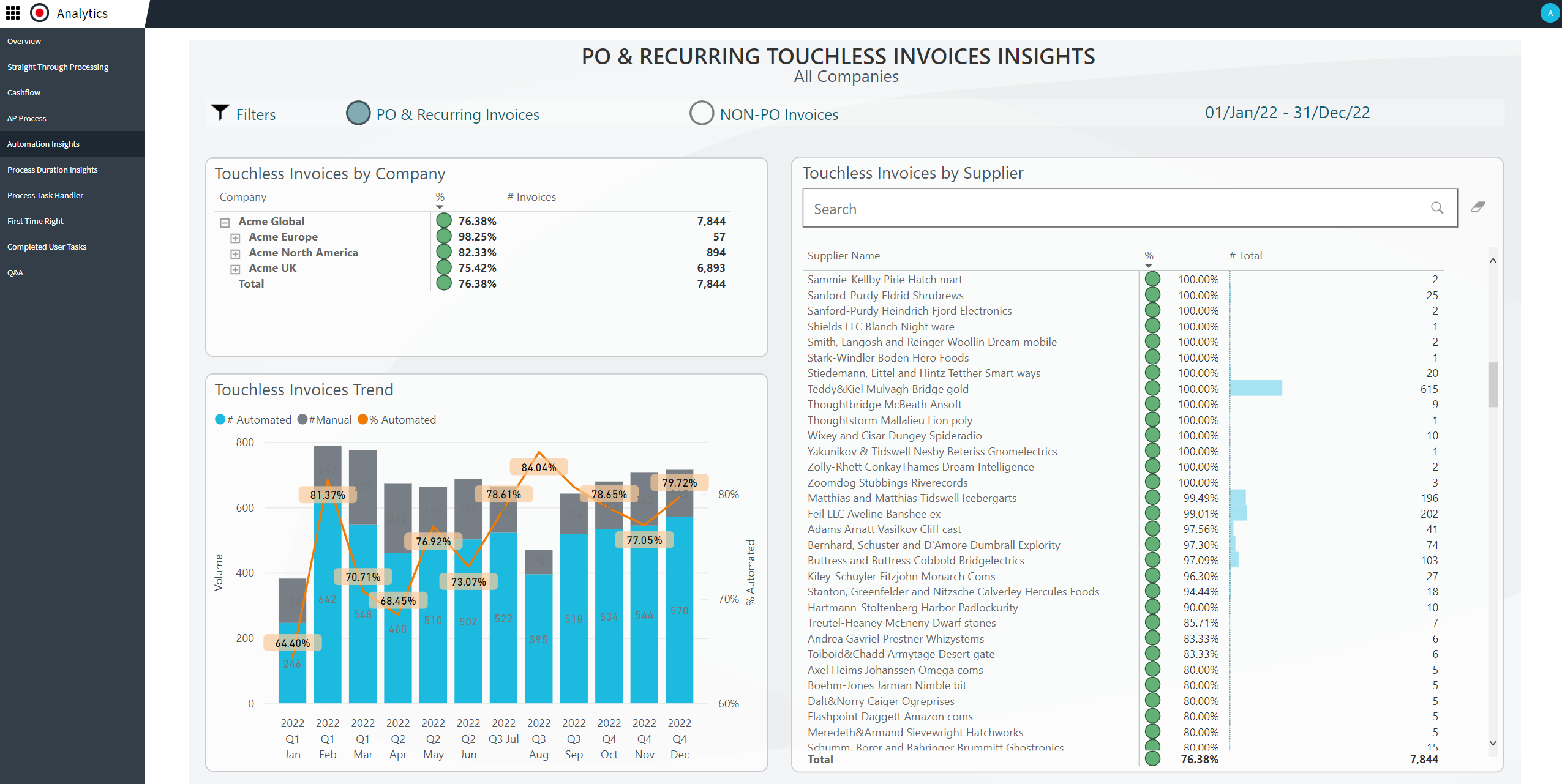
Modern AP automation uses AI to reduce exceptions, detect fraud risk, and increase touchless invoice processing.

According to Medius benchmarks, organizations that automate AP significantly reduce key KPIs, such as invoice cycle times, cost per invoice, and month-end close performance.

AP automation complements ERP systems by automating workflows, controls, and collaboration around the ERP.
Key takeaways
Accounts payable automation software streamlines the entire invoice-to-pay lifecycle, enabling finance teams to operate faster, more accurately, and with greater control.
Modern AP automation goes beyond OCR and basic workflows, using AI features, including AI assistants, to reduce exceptions and improve touchless processing.
Automation improves visibility, strengthens internal controls, accelerates close cycles, and reduces fraud exposure.
Choosing the right solution requires looking beyond payments to include AI, supplier communication, fraud detection, and reconciliation.
Key challenges of manual accounts payable
Manual accounts payable processes struggle to keep up with today’s demands. Common challenges include:
Manual data entry, spreadsheet tracking, rekeying, and email-based approvals
Invoices stuck in inboxes or waiting on approvers
Typos, missed invoices, and duplicate payments
No real-time view of what’s pending, approved, or overdue
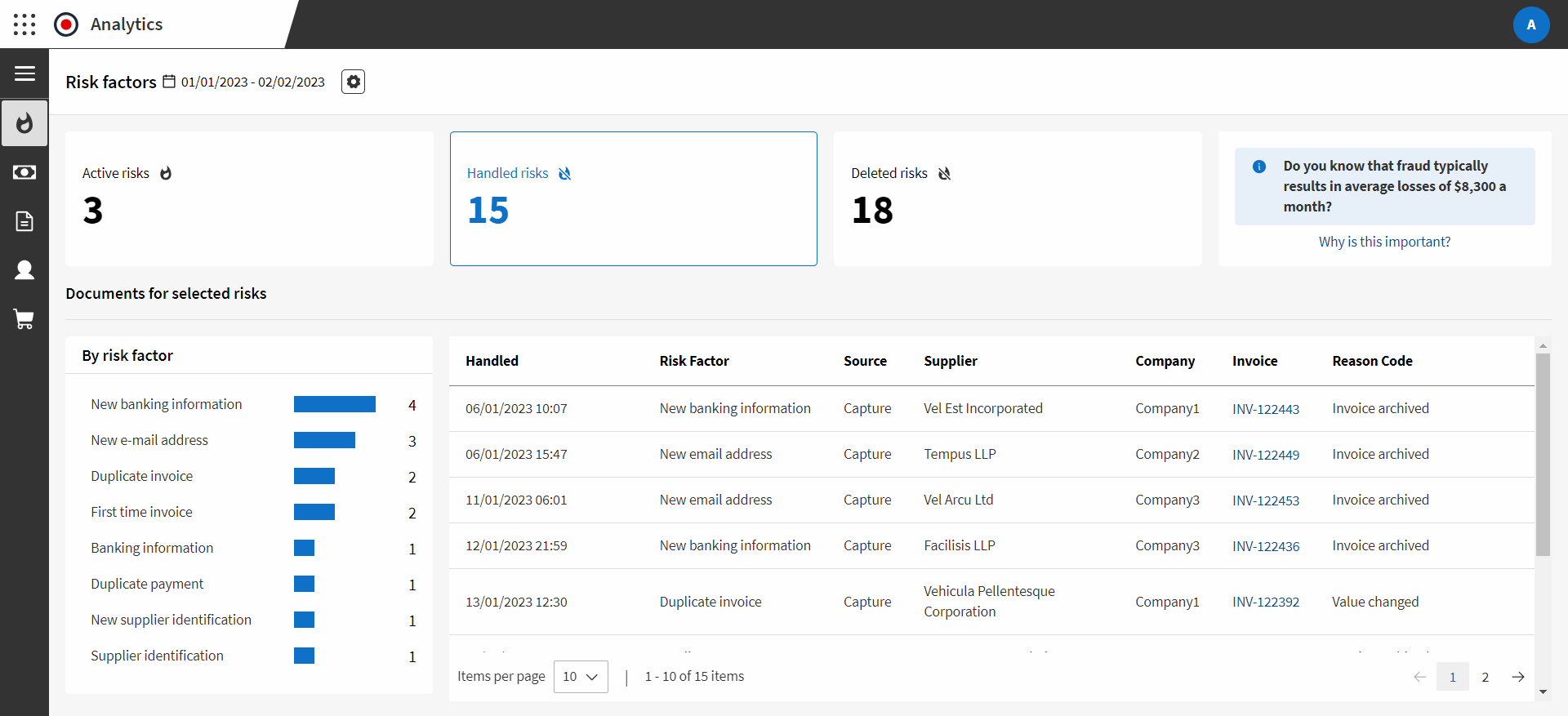
Duplicate invoices, vendor change fraud, and weak controls
Growing invoice volumes require additional headcount
Paper and check-based processes tie teams to the office
These issues lead to late payments, strained supplier relationships, higher costs, and ongoing month-end stress.
Why automate accounts payable?
Organizations automate AP to:
- Reduce processing costs and manual effort
- Improve accuracy and internal controls
- Strengthen fraud prevention
- Enable faster, more predictable close cycles
- Support remote and decentralized teams
- Gain real-time visibility into liabilities and cash flow
According to Ardent Partners, the average time to process an invoice is 11.6 days. Comparatively, Medius customers report average processing times of 3.1 days and best in class as low as 1.4 days.
What are the benefits of AP automation?
The biggest benefit of automated accounts payable is that invoices move faster with
fewer manual touches, while improving accuracy, visibility, and control.
Core benefits include:
Faster invoice cycle times
Lower cost per invoice
Fewer errors and duplicate payments
Improved audit readiness
Reduced fraud exposure
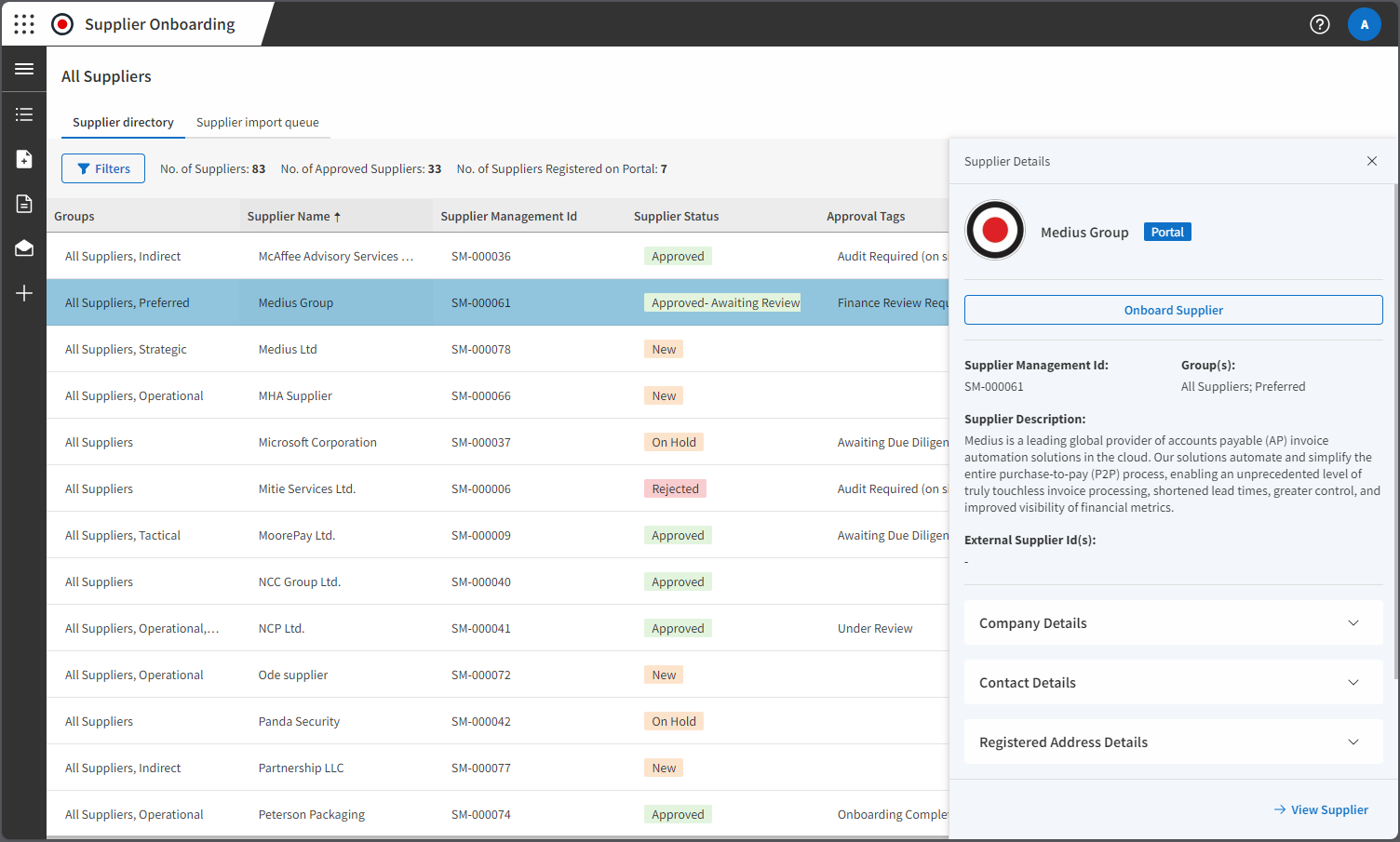
Better supplier relationships
More time for strategic finance work





Calculate your savings
Want to find out how much your company could save with an AP Automation Solution? Try our Savings Calculator. Enter a few figures into our tool to see your potential savings. Compare your metrics against the average Medius customer to see how much you can save. Enter your data for immediate results, or download a custom report.
Automation impact by role
The human side of accounts payable (AP) automation.

AP managers
- Reduces manual workload through automated capture, matching, and routing
- Improves visibility into invoice statuses, holds, and exceptions
- Reduces vendor follow-up through automated updates and centralized communication

CFOs and controllers
- Improves visibility into liabilities, cash timing, and working capital
- Strengthens internal controls and audit readiness
- Reduces fraud exposure with automated checks and approvals

IT leaders
- Reduces technical overhead with cloud-based deployment and fewer point solutions
- Strengthens security through role-based access, encryption, and audit trails
- Simplifies ERP integration via APIs or managed connectors and scales without added infrastructure

Explore a day in the life of an AP manager
Meet Sarah, AP manager. She’ll take you through what it’s like to use AP automation in a day-to-day setting.
Top accounts payable tasks to automate
The highest-impact AP tasks to automate (and were invoice automation delivers the most ROI) include:
Invoice data capture and validation
PO and non-PO invoice matching
GL coding and tax classification
Approval routing and reminders
Exception handling
and dispute tracking
Supplier inquiries and
invoice status updates
How does accounts payable automation work?
Modern AP automation solutions connect and streamline the entire accounts payable process, from invoice receipt to payment and reconciliation.

Invoice capture
Invoices arrive via email, PDF, scan, EDI/XML, or supplier portals. AI extracts header and line-level data without rigid templates.
Validation and matching
Invoice data is validated and matched against purchase orders, receipts, and contracts. Exceptions are flagged automatically.
Approval routing
Invoices follow predefined approval rules based on amount, entity, department, vendor, or category. Approvals can happen from any device.
Exception resolution
AP teams resolve issues in a centralized workspace with full context, with no email chains or spreadsheet tracking.
ERP synchronization
Approved invoices sync back to the ERP in real time, maintaining data integrity and audit readiness.
Payment scheduling and execution
Payments are scheduled using preferred methods such as ACH, virtual cards, real-time payments (RTP), or wire transfers, with full traceability.
Reconciliation and reporting
Invoice and payment statuses are reconciled automatically, and dashboards provide insight into performance, exceptions, and bottlenecks.
This end-to-end automation eliminates bottlenecks, reduces fraud risk, and gives finance teams more time to focus on strategic priorities.
Accounts payable automation
vs ERP alone
ERP systems are systems of record, designed to store financial data and execute transactions. But, ERPs are not built to support modern automated accounts payable workflows end-to-end.
Accounts payable automation complements ERP systems by:
- Capturing invoice data from any format
- Automating matching, approvals, and exception handling
- Enforcing controls and audit trails
- Reducing supplier inquiries through centralized communication
- Improving visibility into invoice status and liabilities

Top AP automation software features
Modern AP automation software should include many of the following features.
Use this checklist as a guide for evaluating AP automation software.
These features are best viewed in landscape orientation or on a larger device.
 |
Core workflow automation |
|
 |
AI and intelligent automation |
|
 |
Fraud, risk, and controls |
|
 |
Supplier experience and exception reduction |
|
|
Payments and reconciliation |
|
 |
Compliance and scalability |
|
AI in accounts payable automation
AI in accounts payable automation is what separates basic digitization from true invoice automation by enabling invoices to flow end-to-end with minimal human intervention, or what Medius calls touchless processing.
What AI does in AP
AI-powered AP automation extracts and validates data from PDFs, emails, and scans without needing rigid templates. It accurately captures header and line-level details from complex layouts, allowing invoices to move through workflows faster and with fewer errors.
AI identifies patterns across invoice formats and learns from historical data to confidently process clean invoices without human intervention. With high confidence in the data, it routes invoices straight into processing, bypassing manual verification and speeding up the AP cycle.
For non-PO invoices, AI predicts and auto-fills general ledger codes, tax classifications, cost centers, and approvers based on historical behavior and contextual data. It helps improve accuracy and reduces errors automatically by suggesting the best approach.
AI analyzes invoice data to detect unusual patterns like duplicate invoices, mismatched payment terms, unexpected price changes, or suspicious vendor behavior. By flagging potential issues early, AI helps AP teams reduce fraud, strengthen internal controls, and simplify audits.
AI assistants in AP platforms help users complete tasks like invoice approvals and status checks using natural language. They offer real-time guidance and context, helping users act faster and reducing the need for training, manuals, or support.
AI reduces supplier inquiries by automatically answering common questions, providing invoice status updates, and routing disputes to the right teams. This leads to fewer vendor emails, faster response times, and stronger supplier relationships, freeing AP teams to focus on higher-value work.
AI can process structured electronic invoice formats like XML, EDI, and PDF eInvoices. This helps organizations comply with regional e-invoicing mandates, reduce manual work, and standardize their invoice processing.
AI automates payments to trusted vendors, requiring minimal manual review. By reducing delays and errors, AI improves cash flow and ensures suppliers are paid on time.
AI streamlines spend controls by flagging out-of-policy expenses, duplicates, and unusual patterns. This boosts compliance, cuts reimbursement errors, and ensures audit readiness across AP and expense workflows.
AI platforms analyze performance data to recommend changes that boost automation rates. Some systems use conversational interfaces, allowing teams to optimize processes easily without technical expertise.

How to tell if your AP solution is AI-driven
It’s not always easy to know what AI features are included in your AP automation solution. Get this buyer’s guide comparison to spot the differences in AI vs traditional tools.
Compliance and e-invoicing readiness
Regulatory compliance is a moving target that continues to grow more complex across regions and industries. AP automation maintains compliance by creating well-organized workflows, maintaining clear audit trails, and ensuring data is accurate and up-to-date.
Modern AP automation platforms typically support compliance by:
- Capturing and validating invoice data in standardized formats
- Supporting e-invoicing requirements and structured invoice formats where required
- Generating detailed audit trails for every action taken on an invoice
- Enforcing approval hierarchies and role-based access controls
- Maintaining secure data storage and transmission aligned with common security and privacy expectations
- With e-invoicing mandates and digital tax reporting becoming more common worldwide, automation is key to helping finance teams stay audit-ready and quickly adapt to new rules.

Bridging the data gap: The hidden risks of e‑invoicing compliance - and how to overcome them
Watch this webinar to learn the latest on e-invoicing changes, global requirements and practical steps to prepare.
Digital payment options
One of the biggest benefits of AP automation is the ability to streamline and control how supplier payments are made. Instead of relying on paper checks or manual bank transfers, AP automation platforms support digital payment methods tailored to your business needs.
Common digital payment types include:
- ACH and same-day ACH
- Real-time payments (RTP)
- Virtual cards
- Wire transfers
- Purchase cards (P-cards), where appropriate
The right AP automation platform helps you choose the best method based on cost, speed, security, and supplier preference, while maintaining a complete audit trail and real-time visibility.
Virtual cards: Secure payments that can generate rebates
Virtual cards are single-use card numbers tied to a specific vendor payment. They can provide:
- Built-in security through single-use controls (amount, vendor, and expiration)
- Streamlined workflows with less printing, mailing, and manual reconciliation
- Audit-ready tracking for every transaction
- Rebate potential depending on card program terms and supplier acceptance
When integrated into the AP workflow, virtual cards can reduce fraud risk and improve payment efficiency, while helping some organizations offset costs through rebate programs.
Supporting remote and decentralized finance teams
Today's finance organizations need processes that work smoothly across different locations, entities, and approval chains. AP automation helps remote and decentralized teams by making it possible to:
- Approve invoices from any device, anywhere
- Handle exceptions centrally without endless email chains
- Maintain secure access controls and audit trails without relying on paper
- Standardize workflows across all business units or regions
This kind of flexibility helps teams keep invoices moving and close cycles on time, even when everyone isn't in the same office.
Real-time invoice and payment status visibility
One of the biggest time drains in AP is responding to requests for invoice status from suppliers and internal stakeholders. AP automation reduces this burden by providing:
- Real-time visibility into invoice status (received, in review, approved, scheduled, paid)
- Centralized supplier communication and dispute context
- Fewer inbound emails and calls requesting updates
- Better transparency that improves supplier relationships


Key AP automation KPIs and ROI metrics
According to Medius benchmarks, the most meaningful indicators of AP automation
success focus on speed, touchless processing, and exception reduction.
Key metrics include:
Invoice cycle time
Percentage of touchless invoices
Cost per invoice
Exception rate
On-time payment rate
Early payment discounts captured
These KPIs help finance teams measure automation maturity, efficiency gains, and ROI over time.
Get the benchmark report for more insights.
Industries using AP automation
AP automation is especially valuable in industries with high invoice volumes, complex approvals, or strict compliance requirements.

Manufacturing
(PO matching, goods receipt notes)

Retail and CPG
(high-volume, multi-entity environments)

Software and SaaS
(non-PO invoice-heavy workflows)

Healthcare
(compliance and controls)

Transportation and logistics

Food and beverage

Construction

Professional services

And more
Industry resources to get you started.

The logistics CFO’s playbook to smarter AP
Get industry-specific guidance on accounts payable challenges and solutions in the transportation and logistics industry.

The construction AP risk map
See how financial risk shows up in the construction industry and how AI-powered AP automation saves your team time, gains control and minimizes risk.
How to select an
AP automation solution
| Step 1 |
Define your scope for AP automationStart by clarifying what you want automation to improve, such as invoice cycle times, touchless processing rates, fraud prevention, or visibility into liabilities. Clear goals help ensure the solution is aligned with business priorities and avoids unnecessary complexity. |
| Step 2 |
Map your current accounts payable process to identify your needsDocument how invoices move through your organization today, from receipt to payment. Identifying bottlenecks, manual steps, and exception drivers helps pinpoint where automation will deliver the most impact. |
| Step 3 |
Know the key features to look for in accounts payable automation softwareLook beyond basic workflows to capabilities such as ERP integration, AI-driven invoice capture and coding, intelligent approval routing, fraud detection, analytics, and compliance controls. These features enable automation to scale as invoice volumes and complexity grow. |
| Step 4 |
Evaluate and compare AP automation solutionsCompare solutions based on usability, scalability, integration strength, security, and total cost of ownership. Focus on how well each platform supports both current needs and future growth, not just feature checklists. |
| Step 5 |
Make the decisionChoose the solution that best aligns with your goals, supports long-term scalability, and earns buy-in from finance, AP, and IT stakeholders. The right platform should deliver measurable efficiency gains while strengthening control and visibility. |
Best practices for implementing AP automation
Implementing accounts payable automation is a strategic shift, not just a technology upgrade.
Success depends on having a clear plan, aligning stakeholders early, and rolling out automation
in manageable phases that deliver value quickly without disrupting day-to-day operations.
The following best practices can help finance teams implement AP automation smoothly and
set the foundation for long-term efficiency and scalability.
Choose an implementation partner with AP expertise
The right implementation partner plays a critical role in adoption and time-to-value. Look for a partner with proven experience in AP automation and familiarity with your industry, invoice volumes, and ERP environment.
An experienced partner can:
- Anticipate common challenges and edge cases
- Recommend best-practice configurations
- Help teams avoid unnecessary customization
This guidance often shortens implementation timelines and reduces post-go-live issues.

Invest in training and change management early
AP automation changes how work gets done. Even the best technology will fall short if users aren’t confident or engaged.
Successful teams focus on:
- Role-based training tailored to AP, finance leaders, and approvers
- Clear communication about what’s changing and why
- Reinforcing benefits such as reduced manual work and better visibility
Addressing concerns early and involving users throughout the process helps drive adoption and long-term success.

Plan data migration and system integration carefully
Data accuracy is essential in AP. When migrating invoices, vendor records, and historical data, plan carefully to ensure completeness and consistency.
Equally important is seamless integration with ERP and financial systems. Strong integrations ensure:
- Accurate, real-time data synchronization
- Consistent audit trails
- Minimal manual reconciliation
A well-planned integration strategy helps maintain trust in the system from day one.

Test thoroughly and incorporate user feedback
Before full deployment, test workflows using real invoices, exception scenarios, and approval paths. Involve end users in testing to surface usability issues or gaps early.
Use this phase to:
- Validate automation rules and approval logic
- Fine-tune exception handling
- Incorporate feedback that improves day-to-day usability
Thorough testing reduces surprises at go-live and builds confidence across the team.

Roll out in phases and optimize over time
Rather than attempting to automate everything at once, many organizations see better results with a phased rollout. Start with core invoice capture and approvals, then expand into matching, payments, fraud controls, and analytics.
This approach allows teams to:
- Deliver value quickly
- Adjust configurations based on real usage
- Continuously increase automation rates over time

Case studies and
additional resources
Case studies


Explore blogs


AP automation FAQs
AP automation uses technology to digitize and streamline the invoice-to-pay workflow. It captures invoice data, routes approvals, syncs with ERP systems, and supports payment execution and reporting from start to finish.
AP automation helps teams process invoices faster with fewer errors and less manual effort. It improves visibility, strengthens controls, reduces fraud risk, and frees up time for higher-value finance work.
Manual AP relies on emails, spreadsheets, paper invoices, and rekeying data, which creates delays and errors. AP automation centralizes workflows, so invoices move faster and are easier to track and manage.
AP automation provides real-time visibility into invoices, liabilities, and payment timing. Faster approvals and fewer bottlenecks help teams plan payments more strategically and avoid late fees.
AP automation reduces late payments, lost invoices, and back-and-forth status inquiries. Suppliers benefit from more predictable payments and clearer visibility into invoice status.
Common KPIs include invoice cycle time, cost per invoice, exception rate, on-time payment rate, and touchless processing percentage. These metrics help teams measure efficiency gains and ROI.
No. AP automation works alongside ERP systems by handling invoice capture, approvals, and collaboration, while the ERP remains the system of record for financial data.
AP automation integrates directly with ERP systems to sync invoice, vendor, and payment data in real time. This keeps records accurate, consistent, and audit-ready.
AI improves accuracy and efficiency by learning from data patterns, predicting coding and routing, and detecting anomalies earlier. This increases touchless processing without constant rule updates.
Yes. Modern AP automation platforms use encryption, role-based access controls, audit trails, and continuous monitoring to protect sensitive financial and vendor data.
Yes. AP automation supports approval controls, invoice validation, audit trails, and structured invoice formats to help organizations stay compliant as regulations evolve.
Implementation timelines vary based on scope and integrations, but many organizations see value within weeks. A phased rollout helps teams adopt automation without disrupting daily operations.
Yes. Modern platforms support multi-entity, multi-ERP, and global environments with centralized workflows and standardized controls.
Organizations should look for strong ERP integration, intelligent automation, fraud controls, compliance support, and analytics that drive efficiency and long-term scalability.